


Places Been - Travel Tracker
4.5261.00 Reviews
App Specs
- Version
- 1.13.1
- Updated On
- License
- Free
- Downloads
- 500,000+
- Developer
- myarx apps
- Categories
- Travel & Local
- Platform
- Android
Screenshots
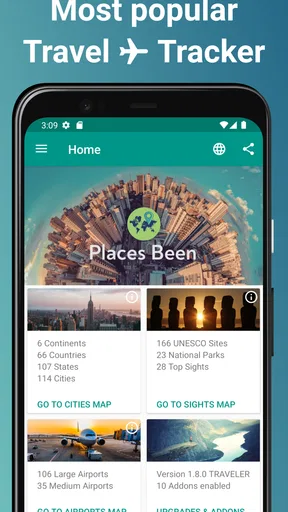
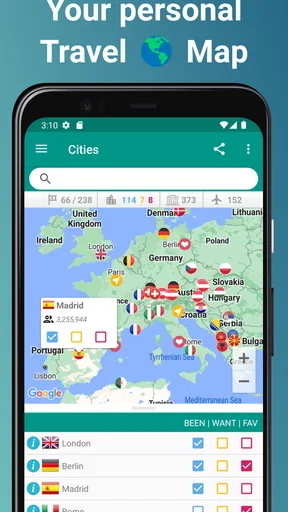
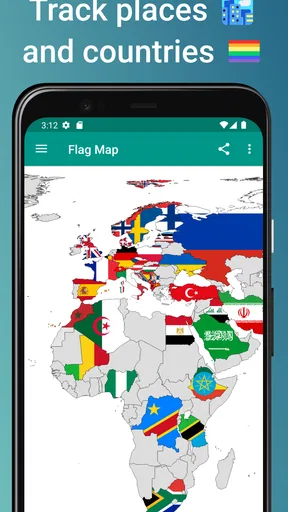
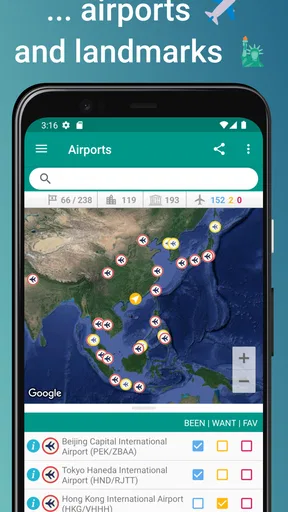
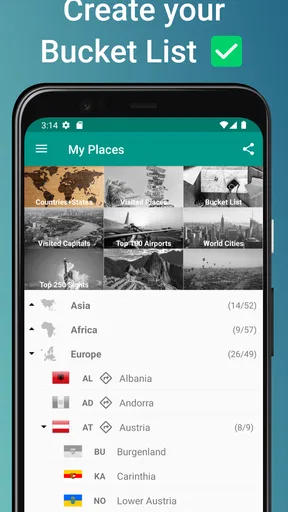
 Analysis by AppCompare
I find a travel tracker most useful when it answers a simple question: where have I actually been, and what places do I still want to see? Places Been - Travel Tracker turns that into a personal map rather than another itinerary to manage. That makes it appealing for people who enjoy looking back as much as planning ahead, though it suits a different purpose from a navigation app or a detailed trip organizer.
What to expect when opening the map
The map is the main attraction, so the experience depends on how you like to record travel. This is not a tool I would choose to guide me through unfamiliar streets in real time. Its value is in building a visual record of destinations and seeing that record take shape. If you want turn-by-turn directions, live transport details, or a carefully scheduled day plan, a dedicated maps or itinerary app is the better fit.
For a casual check-in, the idea is straightforward: add a place when a trip is fresh in your mind, then return later to browse your map or think about the next one. That small habit can prevent the common problem of remembering a major destination but forgetting the smaller stops that made the trip memorable. I would keep additions current rather than trying to reconstruct years of travel all at once; it is easier to catch mistakes while names and context are still familiar.
Why a travel map can be more useful than a list
A list of past destinations is practical, but it can be hard to grasp the shape of your travels from a long series of names. A map gives those memories a geographic context. I like that distinction for people who travel across regions over time: it can make gaps and clusters visible in a way a checklist does not. It is a personal overview, not proof of a trip or a substitute for photos, receipts, or a travel journal.
That difference also helps set expectations. If your main goal is to store hotel confirmations, addresses, reservation times, and notes for each day, a dedicated itinerary organizer is likely more useful. If you mainly want a compact way to reflect on destinations and keep future ideas in view, a map-based tracker is a more natural match. I would treat it as one small part of a travel routine, not as the only place to keep information you need on the road.
Using it around a real trip
Imagine coming home from a weekend away with a handful of stops in mind: the city where you stayed, a nearby town, and a place you passed through on the way back. Adding those while unpacking can make the map feel personal without turning travel record-keeping into a chore. Later, when a friend asks where you have already been in that region, you have a visual prompt instead of relying on memory alone.
A useful workflow is to separate places you have visited from places you hope to visit, then revisit the wish list before choosing a destination. That keeps inspiration distinct from your travel history and can help narrow down options when you have limited time or a fixed budget. The trade-off is that a growing map still needs occasional attention: if you leave entries until long after a trip, you may have to spend time checking which places you truly visited.
Worth Reading Before You Choose

Flipboard Shows What News Apps Must Do Beyond the Feed

Switching to Android Auto Means Rethinking Your Driving Routine

Google Calendar Makes a Crowded Week Easier to Manage

Ludo King Makes the Most of the Minutes Between Plans

Baby Panda World Brings Quick Play to Modern Phones, but Its Game Library Feels Busy

ESPN’s Live Game View Makes Following Close Games Easier
Who will get the most from it
I would recommend this style of app to frequent travelers, people who move between cities for work, and anyone who enjoys collecting destinations as a personal milestone. It can also be a pleasant shared conversation starter when planning a trip with someone who has different travel experience. For a person who rarely travels and has no interest in tracking past places, the map may not become part of their routine.
It is also not the right choice if you expect a tracker to automatically organize every detail of a journey or to replace navigation. A standard maps app is better for getting somewhere; a calendar or itinerary tool is better for timed plans; a photo library is better for browsing images. The appeal here is narrower and more reflective: keeping a place-based record and a set of future destinations together.
Features that Stand Out
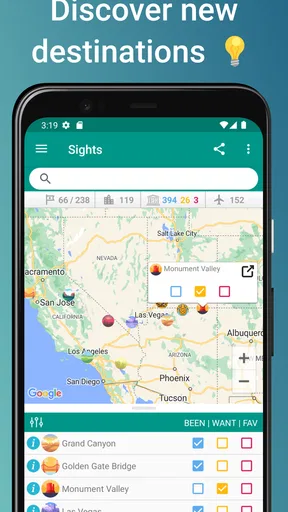
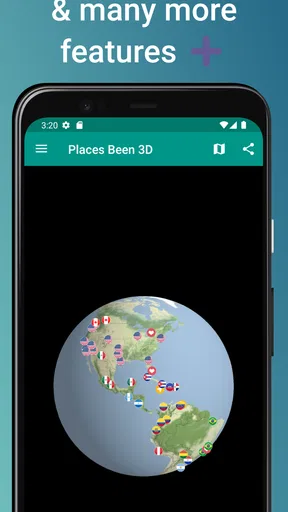
First things first, let’s talk about the interactive map. It’s the heart of the app. You can mark countries and cities you've visited, and the app colors them in, giving you a beautiful visual representation of your travel history. It's oddly satisfying to see the map gradually filling up as you add more places.
Now, if you’re anything like me, you’ll appreciate the bucket list feature. It allows you to pin places you dream of visiting. Every time I open the app, it’s a gentle reminder of the adventures that await. Plus, it helps in planning future trips!
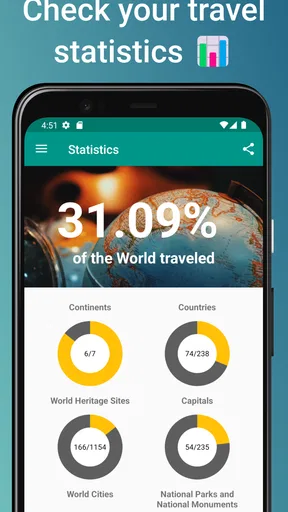
Another nifty addition is the stats and achievements. You can see how much of the world you’ve covered in percentages, and it even awards you badges for visiting new places. It's like a fun game that fuels your wanderlust.
User Experience and Interface
One thing I absolutely love about Places Been - Travel Tracker is its user-friendly interface. It’s clean, intuitive, and doesn’t overwhelm you with too many options. Whether you’re tech-savvy or not, you’ll find it easy to navigate.
The app also offers a dark mode, which is a blessing for those late-night travel musings. It’s easy on the eyes and adds a bit of sophistication to the overall look of the app.
Integration and Compatibility
Let’s talk compatibility. The app syncs effortlessly across devices, which means you can access your travel data whether you’re on your phone or tablet. It’s perfect for those of us who like to switch between gadgets. Plus, it integrates with Google Maps, making it easier to cross-check locations and plan routes.
And for my fellow social media enthusiasts, you can share your travel achievements directly from the app. It’s a fun way to show off your travel milestones to friends and even inspire them to join you on your adventures.
What Could Be Improved
No app is perfect, right? While I adore Places Been - Travel Tracker, there are a few areas where it could improve. For instance, the offline functionality is somewhat limited. It would be amazing to access all features without needing an internet connection, especially when traveling to remote areas.
Also, while the app covers many countries, the city database could be more comprehensive. Occasionally, I’ve found smaller towns missing from the map. However, the developers seem pretty responsive, so I have high hopes for future updates.
How it fits into a travel routine
The best time to update a personal travel map is when the trip is still easy to recall. I would add destinations after returning home, while sorting photos or talking through the journey, rather than interrupting the day to record every stop. That approach keeps the tracker from competing with the trip itself and makes it easier to distinguish places I visited from places I merely considered visiting.
For a longer holiday, I would be selective about what counts as a meaningful destination. Recording every brief pass-through can make a map busy without making it more useful; choosing cities and places I would genuinely want to remember gives the map a clearer story. This is a personal judgement rather than a strict rule, but it helps keep the visual record enjoyable to browse.
Speed, stability, and the practical trade-offs
Because the app is centered on a map and a personal record, I would judge its speed by how easily I can get to a place and update my travel history, not by how many planning tools it packs in. The uncluttered interface described in my experience makes occasional browsing feel approachable. If you are building a large history, though, the useful test is whether you are comfortable adding and checking entries over time; a map is only as accurate as the attention you give it.
I would also avoid treating a travel tracker as a live trip companion when connectivity is uncertain. The limited offline functionality is a real consideration for remote journeys, and it makes sense to keep essential addresses and route information somewhere dependable before setting out. The app is better suited to reflecting on trips and maintaining a personal overview than to handling the urgent details of getting around without internet access.
As with any app that holds a growing personal record, I would occasionally check that the places I care about are represented as intended. That is especially worthwhile after entering a batch of older destinations or smaller towns, since the city selection can feel incomplete in some cases. A quick review at the time of adding places is less frustrating than discovering later that a stop is missing from the map you wanted to share.
Who should choose another tool
If your priority is making reservations, coordinating travel companions, or following a timed schedule, I would use a dedicated itinerary tool alongside—or instead of—this app. If you want turn-by-turn directions, Google Maps or another navigation option is the more practical choice. A photo app will serve better when the goal is to revisit images, while a journal is better for recording what happened and how a place felt. This tracker’s strength is the geographic overview, not replacing those different jobs.
It may also be a poor fit for someone who wants every location added automatically with no maintenance. The experience described here involves marking destinations and keeping a wish list, so it makes the most sense for people who enjoy a little curation. If you would rather not revisit or organize your travel history, a map that needs occasional attention may become another task rather than a source of pleasure.
Availability and overall value
In the travel and local category, Places Been is a free app from myarx apps, with optional in-app purchases ranging from about two dollars to about twenty-eight dollars per item. It is rated for everyone, has an average rating of 4.4 from around 7,900 ratings, and has been installed over 500,000 times. Those figures suggest that the map-based idea has found an audience, but they do not change the practical question: will you enjoy keeping a visual record of where you have been?
The app was released in 2019 and its current version is 1.12.1. It requires Android 7.0 or later, which is worth checking if you use an older phone. I would look at the optional purchase choices in the app before paying for anything and decide whether the free experience already covers the way you want to track destinations. The basic appeal is clear even without turning the map into a project: keep a personal overview, remember places more easily, and let future ideas sit alongside past trips.
Final Thoughts
Overall, Places Been - Travel Tracker is a must-have for travel enthusiasts. It’s not just an app; it’s a little reminder of the adventures you’ve had and the ones yet to come. Whether you’re a seasoned traveler or just starting your journey, it adds a layer of excitement and organization to your travel plans.
If you’re looking to keep your travel memories alive while planning new adventures, give this app a shot. Trust me, you’ll find yourself opening it more often than you think, just to bask in the nostalgia or plan your next escape.
My recommendation comes with a clear caveat: think of it as a travel scrapbook with a map at its center, not as an all-purpose trip manager. For someone who enjoys seeing destinations accumulate and likes having future places in view, that focused role is a strength. For anyone who needs reliable offline navigation or a complete itinerary, it should sit beside a more suitable tool rather than replace one.
Performance verdict
On performance, I would keep expectations grounded in what the app is designed to do. It is a personal map and travel log, not a resource-heavy navigation suite in the sense of constantly guiding a route. The simple interface makes it easy to approach, while the most likely friction points are practical ones: limited offline use, occasional gaps in smaller-city coverage, and the care needed to keep a personal map accurate. I would use it for relaxed travel tracking and browsing, and keep essential trip information available elsewhere.
Pros
- User-friendly interface for easy navigation.
- Offline mode available for remote areas.
- Supports sharing trips on social media.
- Detailed statistics on visited places.
- Customizable map views and markers.
Cons
- Limited free features in basic version.
- Occasional GPS accuracy issues.
- No integration with other travel apps.
- Frequent ads in free version.
- Lack of support for certain languages.
FAQs for Places Been - Travel Tracker
What is Places Been - Travel Tracker used for?
Places Been - Travel Tracker is designed to help users log and visualize their travel experiences. It allows users to mark countries, cities, and landmarks they have visited, providing a comprehensive overview of their travel history. The app is perfect for travel enthusiasts who wish to keep track of their journeys and share their accomplishments with friends.
Is Places Been - Travel Tracker available offline?
Yes, Places Been - Travel Tracker offers offline functionality. Users can add and save their travel data even without an internet connection. This feature is particularly useful for travelers in remote areas or those who want to avoid roaming charges. The app synchronizes updates when the device reconnects to the internet.
Can I customize the map on Places Been - Travel Tracker?
Absolutely! Places Been - Travel Tracker allows for extensive map customization. Users can choose different map styles, colors, and markers to personalize their travel map. This feature enhances the visual appeal of the map and caters to individual preferences, making each travel log unique and visually engaging.
How does Places Been - Travel Tracker ensure data privacy?
Places Been - Travel Tracker is committed to protecting user privacy. The app employs secure data encryption to safeguard personal information and travel logs. Additionally, users have control over their data sharing preferences, ensuring that only they and selected parties can access their travel history unless explicitly shared.
Is Places Been - Travel Tracker suitable for group travels?
Yes, the app is ideal for group travels. It allows users to create shared travel logs, which can be updated collaboratively by all group members. This feature facilitates seamless tracking and sharing of group travel experiences, ensuring everyone is on the same page and can contribute to the travel story.


